QuickStack.me Domain
QuickStack includes a built-in "magic" domain service called quickstack.me. This feature allows you to instantly assign a valid, SSL-secured domain name to your applications without needing to purchase a domain or configure DNS records manually.
How it Works
The quickstack.me service works by mapping a specially constructed hostname to your server's public IP address. It uses a hexadecimal representation of your IP address to create a unique base domain for your QuickStack instance.
For example, if your server's public IP is 1.2.3.4:
- QuickStack converts it to a hexadecimal string:
01020304. - Your instance's base domain becomes
01020304.quickstack.me. - Any subdomain you create (e.g.,
myapp.01020304.quickstack.me) will automatically resolve to1.2.3.4.
This allows QuickStack to automatically provision valid SSL certificates via Let's Encrypt for these domains, giving you HTTPS access out of the box.
Prerequisites
To use the quickstack.me domain feature, your QuickStack instance must have its Public IPv4 Address configured.
- Go to Settings in your QuickStack dashboard.
- Ensure the Public IPv4 Address field is set to your server's reachable public IP.

Using a QuickStack.me Domain
You can assign a quickstack.me domain when adding or editing a domain for an application.
-
Navigate to Application Settings:
- Open your application in the QuickStack dashboard.
- Go to the Domains tab.
-
Add a New Domain:
- Click Add Domain.
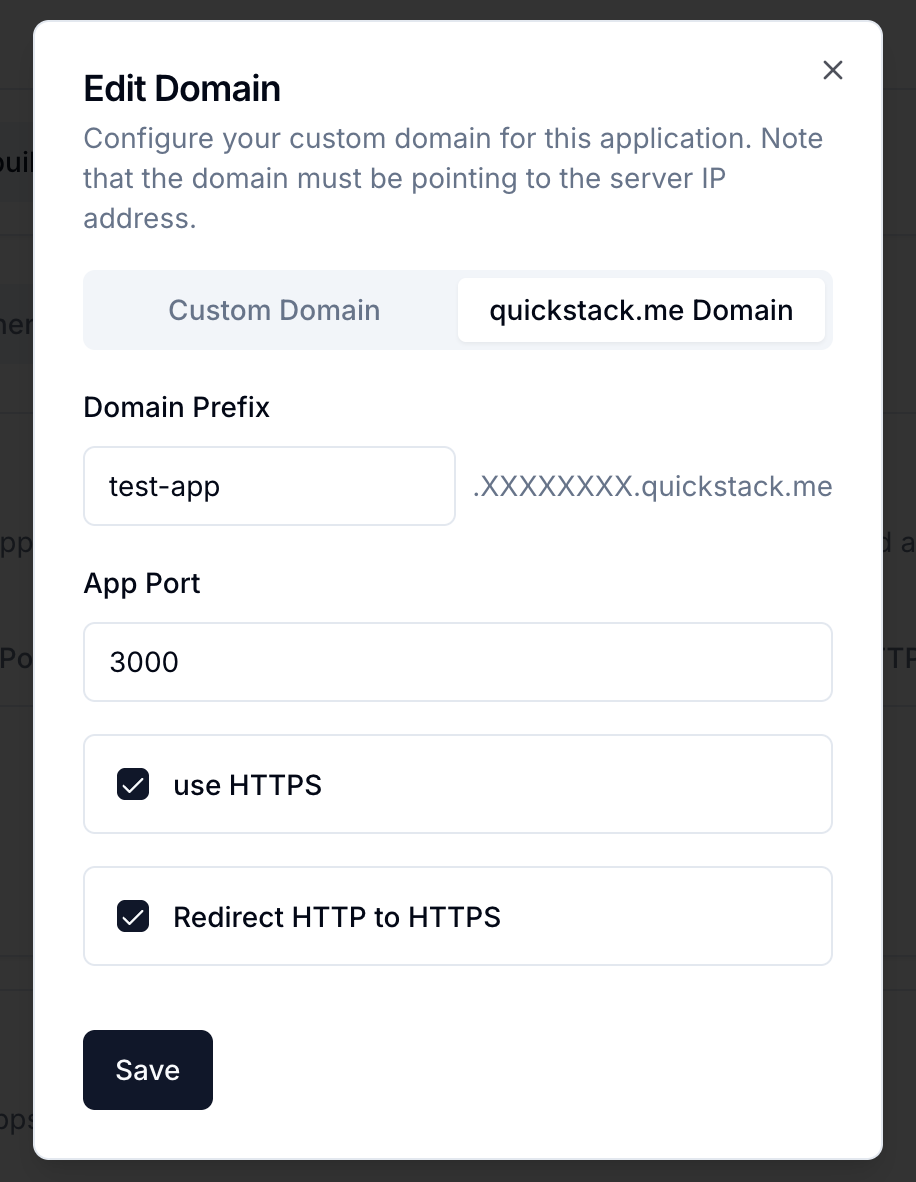
- In the dialog, switch to the quickstack.me Domain tab.
- Domain Prefix: Enter a unique prefix for your application (e.g.,
my-app,blog,test). - App Port: Specify the port your application is listening on (usually
80). - Use HTTPS: This is enabled by default and recommended.
- Redirect HTTP to HTTPS: Enable this to force secure connections.
- Save and Deploy:
- Click Save.
- Click Deploy on the application dashboard to apply the changes.
Your application will now be accessible at https://<prefix>.<hex-ip>.quickstack.me.
When to Use It
The quickstack.me domain is perfect for:
- Testing and Development: Quickly exposing apps without setting up real domains.
- Internal Tools: Accessing management tools securely.
- Initial Setup: Verifying your deployment works before configuring a custom domain.
For production workloads or public-facing brands, we recommend using a Custom Domain (e.g., yourcompany.com).